• Blog
  • Shop
  • Resources
  • FAQ (Ask TGS)
  • About
  • Archive
  • Contact
  • Sign In My Account
Menu

The Gentleman Stationer

Vintage Living in the Modern World.
  • Blog
  • Shop
  • Resources
  • FAQ (Ask TGS)
  • About
  • Archive
  • Contact
  • Sign In My Account

Pen Review: Diplomat Aero

October 29, 2016

The biggest surprise from my 2016 D.C. Pen Show Haul was one of the lesser-known pens that I picked up: the Diplomat Aero. Diplomat is not as well-known in the States as other major German brands like Pelikan, Montblanc, Lamy, and Faber-Castell but they are building a small and loyal following, moreso than other smaller German manufacturers such as Otto Hutt and Cleo-Skribent. Let's just say there's a reason that they've been around since 1922. I've had the opportunity to write with multiple pens in Diplomat's lineup, and have been uniformly impressed, especially with the quality of the nibs. Along with the Otto Hutt Design 06, the Diplomat Aero has recently been one of my daily workhorses.  

Unique Design and Quality Build

The "ribbed" design of the Diplomat Aero is its most distinctive visual feature. 

The Aero sports one of the most unique fountain pen designs out there right now. (Well, there might be designs that are more "unique," but I'm referring to designs that are both unique and don't destroy the functionality of the pen.) It's inspired by the "Zeppelin" airships of the 1920s-1930s. The Company's "propeller" logo is painted on the top of the cap - more on that below. Overall, I enjoy the design. At first glance, some might consider this pen a little weird looking and even ostentatious, but in real life the design ends up being fairly understated, especially in the matte-black/gunmetal color scheme. 

I enjoy using this pen posted more than unposted. The Aero is manufactured from relatively lightweight aluminum, so the fact that the pen is metal doesn't really affect the overall balance or make it awkward to use. 

The Aero's aluminum construction gives it some heft, but this is a well-designed and well-balanced pen. Personally, I think this pen has better balance posted rather than unposted, but that's my preference with most pens as long as they aren't too long. The slip cap fits tightly, with no wiggle or play. It also posts firmly on the tapered end. The anodized section is grippy, slightly tapered, and makes the Aero a comfortable pen to use for long periods of time.  

Those who don't like to post their pens will still be able to use the Aero just fine. 

The clip has what I consider to be the optimal level of tension. It's not so loose that it feels flimsy, but it's not so tight that it won't easily clip to a shirt pocket. The matte black anodization on the clip makes it slide even easier.

I was able to easily scrape the Diplomat "propeller" logo off the top of the cap using a fingernail. Fortunately I like the look of the unadorned cap better. 

The one issue I have with this pen has to do with the finish. Not necessarily the anodized coating that's applied to the metal body, clip, and section - which has held up very well - but with the painted Diplomat logo on the top of the cap. Mine started to flake off almost immediately, and I finally got so fed up with it that I took my fingernail to it and was able to completely remove it in less than 10 seconds. Honestly, this isn't a big deal for me because I like the plain black cap better than adorned version, but at this price point Diplomat needs to either fix this issue by actually etching the logo into the anodized coating or remove it from the top of the cap entirely. Flaking paint makes an otherwise excellent pen look cheap. 

An Extremely Smooth JoWo Nib

As fun as the design is, the nib is what makes this pen a joy to use. My Aero sports a very smooth and very wet JoWo medium. This nib might be slightly wider than optimal for my style of writing, but for a stainless steel nib, it's been tuned perfectly. I met the Diplomat distributor at the D.C. Pen show, who told me that Diplomat has employees in the JoWo factory who personally test and tune all Diplomat nibs before they leave. I tend to believe this, because of the two Diplomat pens I own - the Aero and the lower-priced Diplomat Esteem - both write much better than stock JoWo nibs that I've purchased from other sources. These nibs clearly have been tuned. 

Diplomat-branded JoWo medium nib. 

Diplomat uses a standard cartridge/converter filling system. Nothing too exciting here. 

Takeaways and Where to Buy

I like this pen and don't regret adding it to my rotation. While the flaking paint issue is annoying, the nib is outstanding and I love the design and the matte black color scheme. (If it's all-black or red, I'll typically buy it.)

Diplomat is popping up in multiple online retailers as the brand gains popularity. MSRP on the Diplomat Aero is $195, with some dealers selling for around $160, which is what I paid purchasing from the distributor directly at the D.C. Pen Show. While I really enjoy the pen, $160 is high, and $195 prohibitively expensive, especially compared to a similarly priced pen like the Otto Hutt 06 that didn't have the annoying flaking paint issue.   

Fortunately, you can usually find the Aero on Amazon at a more reasonable price (though the actual price changes regularly). Massdrop deals on this pen also pop up from time to time. In addition to the matte black model featured in this review, the Aero comes in a silver version and a very attractive brown. (Honestly, I eventually may pick up a brown version for myself. The color looks that good.) 

Further Reading  

The Aero's newfound popularity has resulted in a lot of reviews out there, mostly positive. Check out Brad's review over at the Pen Addict, Matt's review at The Pen Habit, Mike's at Inkdependence, and Ian's review over at Pens! Paper! Pencils!.

Disclaimer: This post contains affiliate links. I purchased the pen featured in this review with my own funds, for my own personal collection. 
In Pens Tags Pen Review, Diplomat
3 Comments

The Slice Planner's "Clockface" diagram provides a visual representation of how you spend your time each day.

The Slice Planner (on Kickstarter Now!)

October 26, 2016

Kickstarters upon Kickstarters, that seems to be the theme for this month! Out of all the projects that I've had the opportunity to review, however, the Slice Planner has been the first where I've seen the project and thought, "I have a clear use case for that and I can't find it anywhere else on the market." 

The Slice Planner claims to be "built around [the] core concept of easy synchronization between your paper notebooks and all your digital calendars, whether you use Outlook, Google, or Apple." It looks to accomplish this by combining a high-quality notebook with an app that makes it easy to scan handwritten entries into your digital calendar. Other companies have attempted similar "digital notebooks" in the past, with middling success. The most well known has been Moleskine, which sells an Evernote-integrated notebook and a "smart writing" pen/notebook set, which appears to have since been integrated on some level with the Livescribe 3 Smartpen. Slice Planner looks to take this idea a step further by offering reliable calendar integration.

So why does this project interest me? Recently, I've been looking for a notebook which can serve as a kind of "work journal," keeping track of how much time I spend on the various projects I have going on at any given time (including both the day job and the blog). The Slice Planner struck me as a good candidate. More than one week in, I'm very happy with how things have worked out, and can see myself using this notebook in this role going forward, regardless of how the app turns out.  

The Notebook and "Clockface"

Photo courtesy of Slice Planner. This shows both the clothbound and leather versions, and also provides a fairly good indication of the size (approximately A5). 

Before I even get into any of the "techy" features, or how the Slice Planner fares with its stated goal of "bridging the physical and digital divide," I want to say this: the Slice Planner is a great notebook, and the notebook itself is enough for me to back this Kickstarter, even if I never end up using the bundled app.  

My gray Slice Planner. 

The notebook measures 5.5 x 8 inches, is clothbound, and contains two ribbon bookmarks and the omnipresent elastic strap to hold the book closed. The book itself seems very well made, and has held up well to my daily use. It's ever-so-slightly larger than a Baron Fig Confidant, but sports a similar cloth binding and lay-flat design. 

The Slice Planner compared against the Baron Fig Confidant (top). The Slice Planner is slightly larger than the Confidant. 

The inside of the Slice Planner features an undated, two-page-per-day layout. I love undated planners and notebooks, which avoid wasting paper on days when there isn't much to "plan" (such as days off, vacations, holidays, etc.). The left-hand page contains a "clockface" diagram which tracks 12 consecutive hours of time. You determine where on the diagram you want your day to "begin", and go from there. The right-hand page contains blank dot-grid paper for notes, diagrams, drawings, whatever.  

Many people have noted the visual similarity to the Chronodex, by Patrick Ng. While the Slice Planner certainly borrows from the Chronodex, in the sense that both use the "clock face" circular layout, it's not an exact copy. For one thing, the Slice Planner tracks only 12 hours of time, whereas the Chronodex is designed to track up to 18. The folks at Slice Planner explain this based on a survey showing that, on average, most people do not plan more than 9.5 hours a day. Personally, I find the simplified Slice Planner diagram easier to use than the Chronodex, which never stuck with me. Since I don't use the Slice Planner as my primary calendar, the 12-hour limitation isn't an issue for me.  

Yes, the Paper Is Reasonably Fountain Pen Friendly

Per the Kickstarter project page, the notebook contains "224 pages of acid-free premium Swedish paper for sketching and writing." I'll go ahead and get this out of the way first, because I know it's what everyone wants to know: Yes, it works fine with fountain pens. I experienced no bleed-through using any fountain pen I tried, which were limited to extra-fine, fine, and medium nibs. The only pen I used that exhibited some bleed-through/show-through was the Baron Fig Squire rollerball refill (which is the same as the Schmidt rollerball refill that ships with Retro 51 pens). Lamy Copper-Orange ink didn't work great (feathered a bit), but the the flip side of the page was still usable. I never tried to push this paper with especially wet nibs, but I imagine that you might see some feathering and bleeding with double broad nibs and stubs. 

Testing various inks in my Slice Planner. You can see some show through from the following day, but no actual bleed. 

Some have compared the paper to Baron Fig, but it reminds me more of Fabriano paper. The two are similar, but I've found Fabriano to be slightly more fountain pen friendly.    

The App

And, finally, we get to the digital-analog integration aspect of this project. The project page makes it pretty clear that the Slice Planner app is NOT intended to replace your regular digital calendar, but rather to complement it by providing users with extra flexibility and making it more convenient to import things like appointments and notes into your phone or tablet. 

Photo courtesy of Slice Planner. The app is designed to scan "events" from your diagram and import them into both the Slice Planner app and your calendar. The Slice Planner app will also import existing calendar appointments into the clockface diagram. 

The build of the Slice Planner app that was made available to me had limited functionality, but if it works as promised, I could see how I would use it occasionally. My day is often hyperscheduled with conference calls, appointments, hearings, etc., and needs to be broken down into time increments smaller than what I suspect the Slice Planner would be able to handle. I do plan to give the fully functional app a chance once it is released, and I'm excited to test the accuracy of the handwriting recognition feature.  

That said, I'm not entirely convinced that opening a third-party app, waiting for it to access the camera, scanning in the information, correcting any handwriting recognition errors, and verifying that the entry is correctly reflected in your calendar app of choice ends up being more efficient than simply opening Fantastical or Omnifocus (two absolutely awesome apps that I use to manage my life) and entering an appointment/task manually or via Siri or Google Assistant. I'm pretty quick with my phone. That said, I'm excited to see developers and companies acknowledging that people still use paper planners and notebooks, and trying very hard to come up with thoughtful ways to accommodate these preferences. The Slice Planner app/calendaring system may end up working very well for some people; given my specific needs, it will require a lot more testing before I know whether it's something I can incorporate into the rotation.

Should You Back It? 

UPDATE: The Slice Planner was a successful Kickstarter, and is now available for purchase via Amazon. 

I backed the Slice Planner immediately, simply because I want two more of these notebooks. As discussed above, I probably won't use this as a classic planner, but more as a journal/notebook for tracking time management and work progress. While the App could be a nice bonus, it's not what's driving my decision to support this project.

You can back the Slice Planner by visiting their Kickstarter project page. The project is almost fully funded with 30 days to go, and rewards are still available for December delivery. Clothbound and leatherbound notebooks are available; the leatherbound notebooks accept a refill which Slice Planner will be selling aftermarket.

Disclaimer: I was provided with a prototype Slice Planner for review purposes, free of charge. I was not otherwise compensated in any way for this review, and the funds that I used to back the project are my own. This post contains affiliate links.

In Notebook Review, Planner Tags Slice Planner, Notebook Review, Planner
1 Comment

Pen Review: Trilogy Zero (On Kickstarter Now!)

October 22, 2016

Last week, I posted a brief announcement for the Trilogy Zero Minimalist Fountain Pen, which is now live on Kickstarter. Before I get into the details of this pen review, I should say that the pen Trilogy sent me for review is a prototype, NOT a final product. Trilogy was very insistent that the prototype had certain flaws that they plainly identified to me before sending me the pen, and which will be corrected before the final Kickstarter products ship to buyers. 

That said, I like the Trilogy Zero overall, and I came away from the review impressed. This pen is not for everyone, but most machined metal pens aren't. Let's take a look in a bit more detail. 

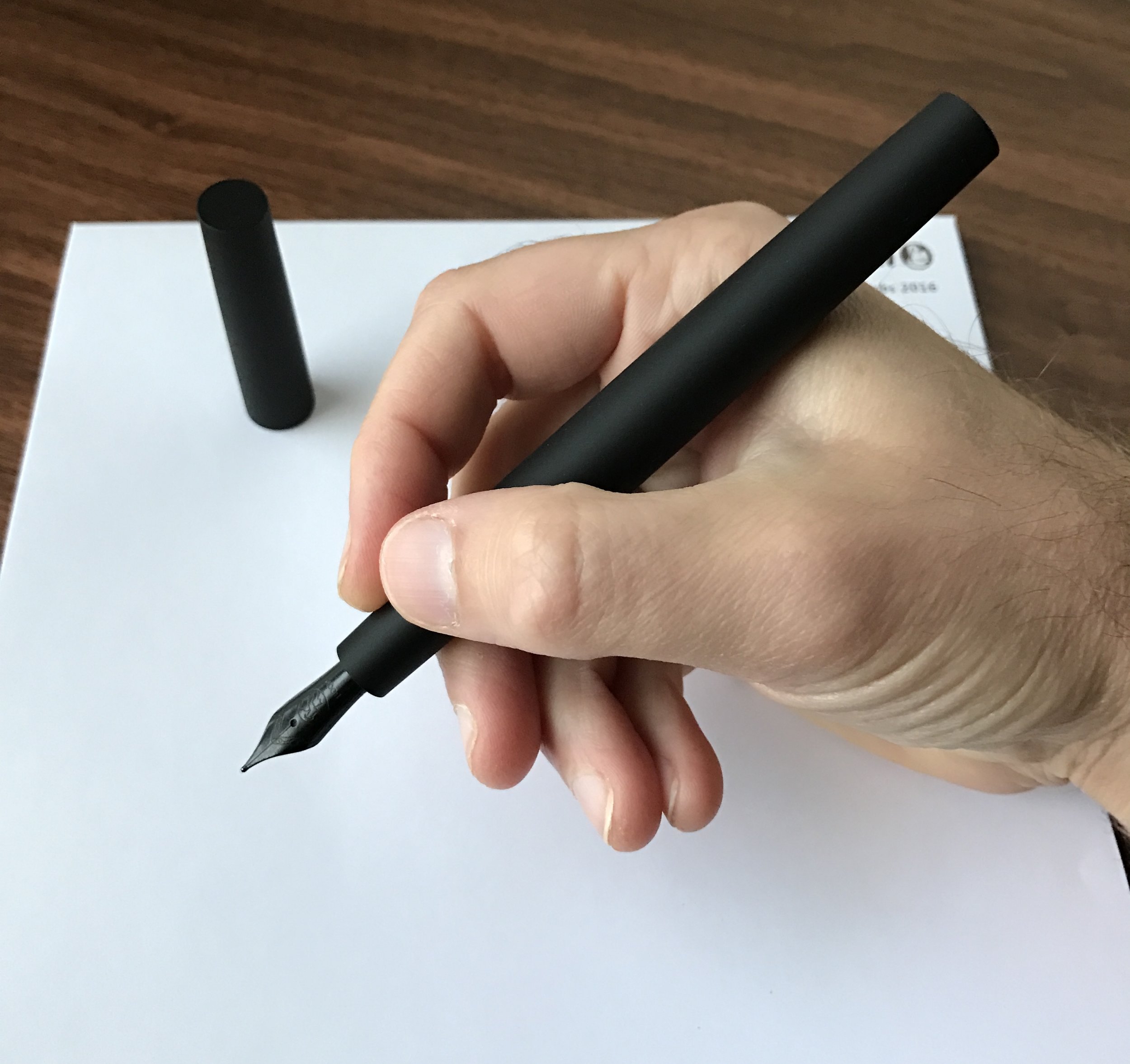
The Trilogy Zero features a smooth section and a black PVC-coated Bock Nib.

What I Liked about the Trilogy Zero

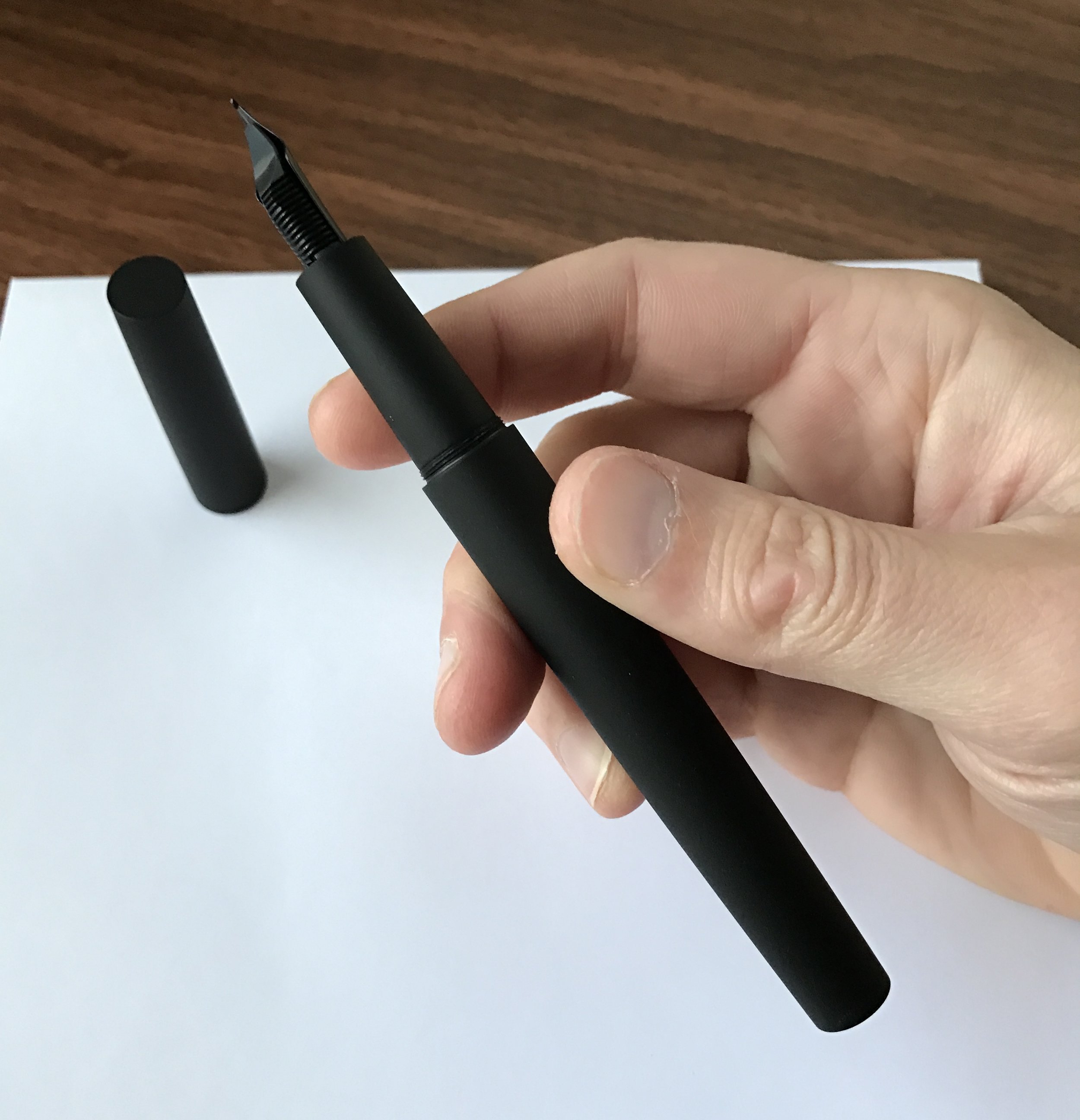
  • Size and Comfort. As other reviewers have observed, the Zero is larger in real life than it appears in the pictures, or at least it ended up being much larger than I expected. The added length balances the pen well for writing, especially since the cap doesn't post. The section is rather large, without a pronounced step down from the rest of the barrel, so you should be able to get a comfortable grip no matter how you hold your pen. 
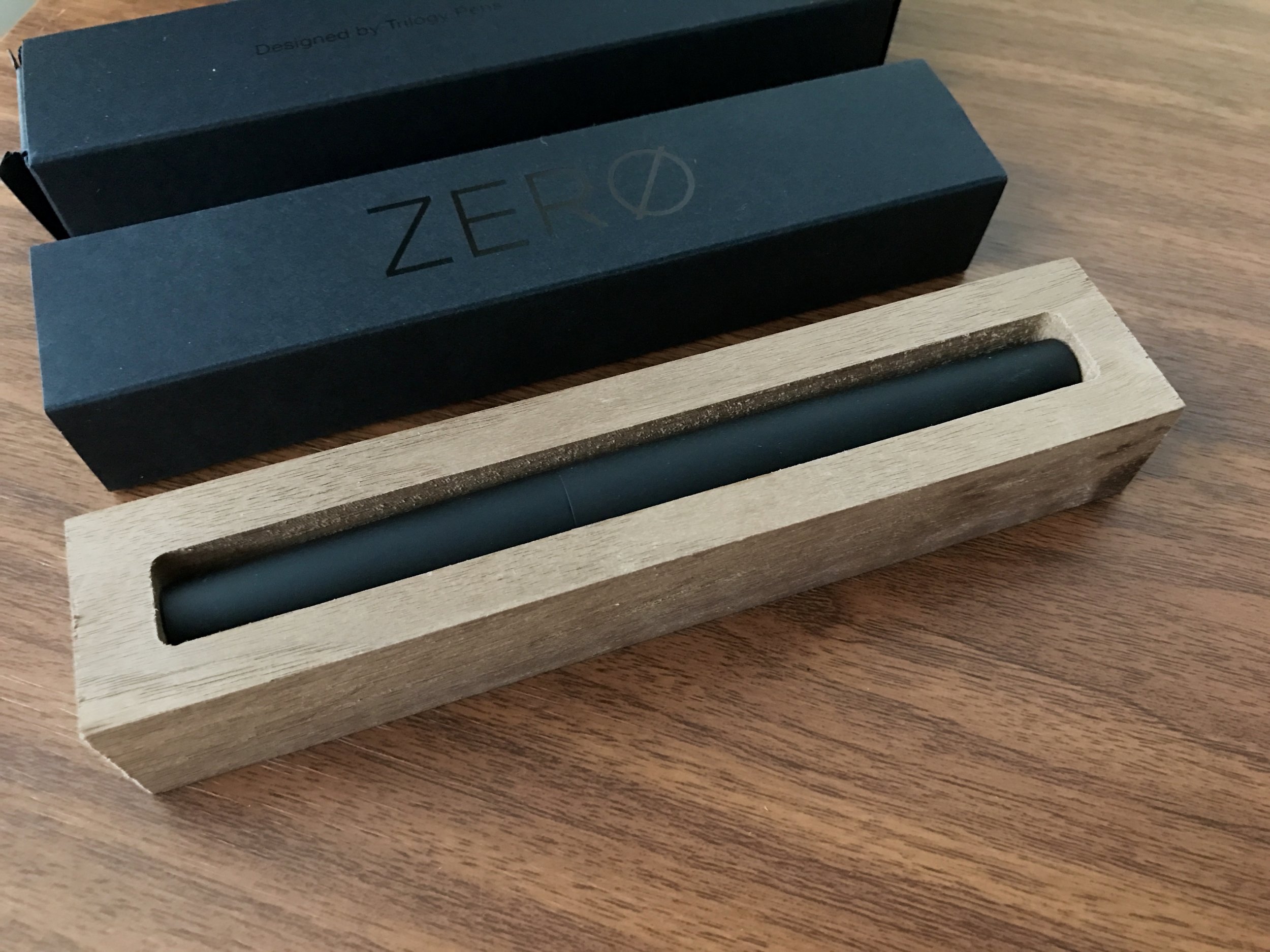
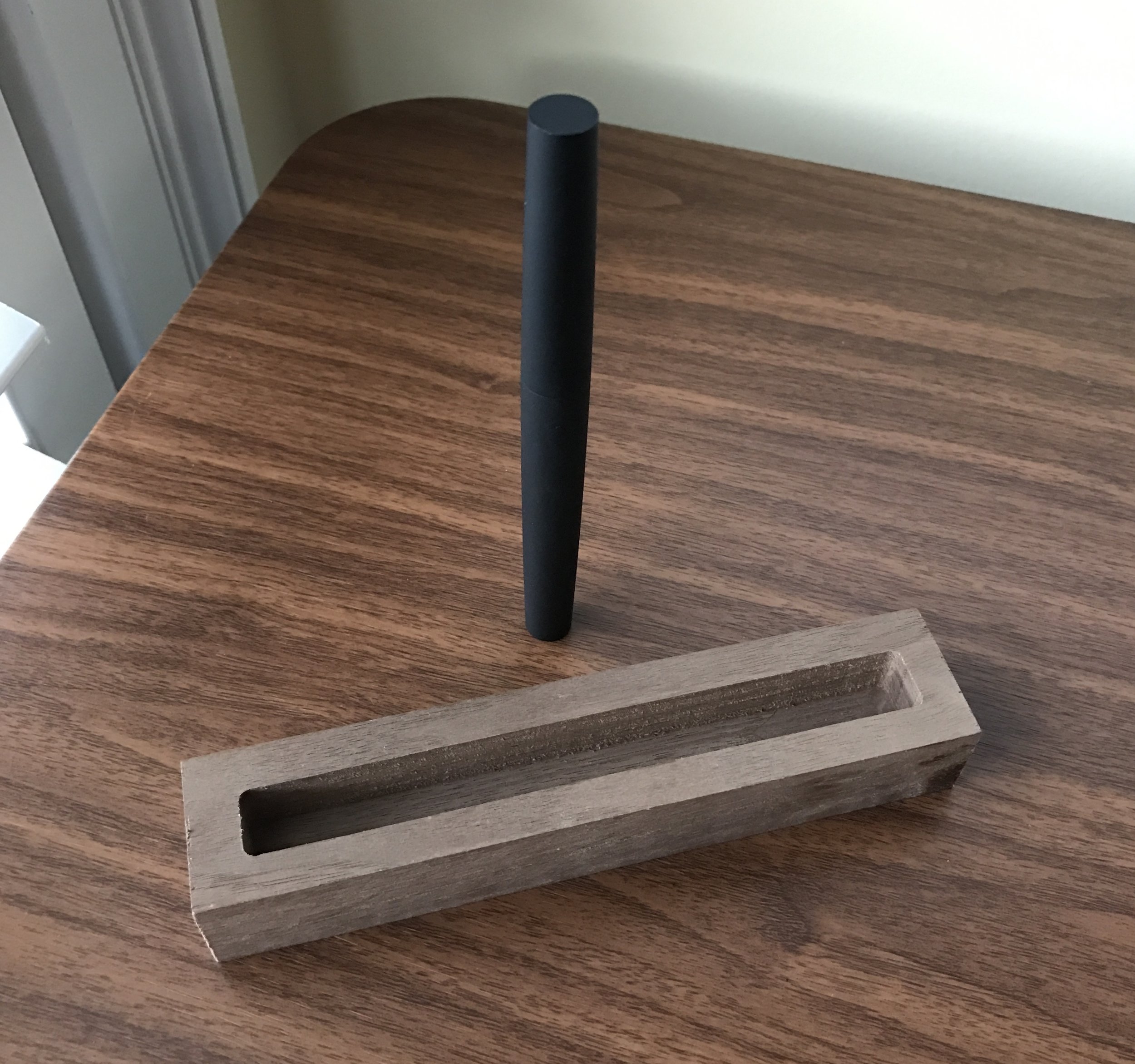
  • Presentation. The packaging is sleek and well-made. I like the concept of the wood box/pen rest that ships with the Zero, but wish that they had spent a bit more time on the finish. More on that from Mike Dudek. With a bit of polishing, the wood box might make an excellent piece for your desk. 
  • Flat Ends. The Trilogy is completely flat on both ends, creating a tapered cylinder that will stand up vertically on your desk. I've done this at work and at home, and haven't had it fall over yet. The Zero's design reminds me of a more slender, tapered Newton Shinobi.  
  • Nib. Trilogy uses Bock nibs, and the medium I received is a good one. I've had hit-or-miss experiences with Bock Nibs in the past, but I can't complain here. The black nib is coated, including the underside of the nib and tipping material, so there may be a brief period after you first receive the pen where there is slightly more feedback. I experienced this as the nib "squeaking" for the first page or so that I wrote, but it disappeared as the nib broke in. Again, I've noticed this on other PVC-coated nibs, and is nothing unique to this pen.     
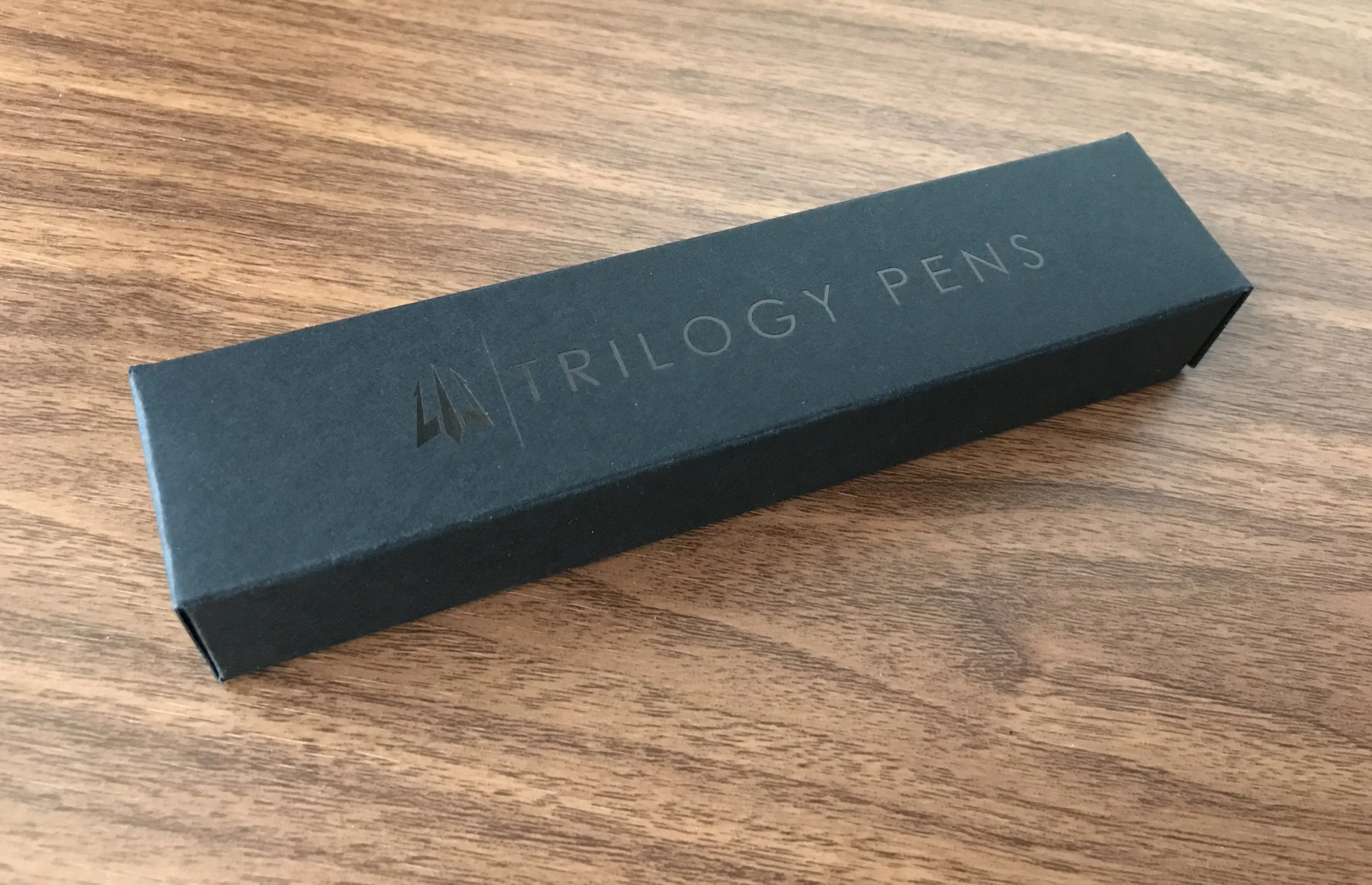
View fullsize Trilogy Zero Outer Box
View fullsize Trilogy Zero Inner and Outer Box
View fullsize Trilogy Wood Pen Rest, with Zero
View fullsize Trilogy Zero with Pen Rest
View fullsize Trilogy Zero in-hand
View fullsize Trilogy Zero Size Perspective

What I Didn't Like

  • Portability. Size is a double-edged sword. The Zero is very comfortable to write with, but it's not very portable. The length of the pen when capped makes it difficult to fit the Zero into certain pen cases and pen wraps, and it's impractical to carry in my pants pocket. This may be a personal preference, but when I think "minimalist pen," I think of something that I can slip in my jeans pocket and take anywhere on a moment's notice.
  • Wear on the Finish. The black coating on the aluminum looks great, but has a tendency to wear along sharp edges, especially the threads. I haven't used this pen that hard yet, and I expect to see similar chipping and flaking on the flat-end of the Zero.  
  • Squeaky Threads. This issue is something that Trilogy is aware of, and has indicated that they have resolved in the final production specs. I'm not really sensitive to it, but some people have noticed a "nails-on-chalkboard" noise when you screw/unscrew the cap.
  • Marketing. I found the emphasis on "minimalism" in the Kickstarter marketing materials to be a bit over the top. ("A Minimal Fountain Pen Designed to Distill Writing to its Finest, Most Essential Form. A Seamless Link Between Mind and Reality.") That's a personal preference, though, and may speak to some people more than others. 

Promotional photo for the Trilogy Zero fountain pen in silver (Courtesy of Trilogy Pens)

Should You Back this Kickstarter? 

If you enjoy pens like the Namisu Nova, the Karas Kustoms Ink, or the Tactile Turn Gist, the Trilogy Zero caters to a similar niche. You should expect some of the issues I highlighted in this review to get ironed out as Trilogy finalizes their production specs. I consider the Zero a relatively low-risk Kickstarter project to back because the price of the pen is so reasonable. While Early Bird and Super Early Bird pricing is sold out, you can still pledge $60 and receive one Zero, or $105 and receive two. Pens are available in silver or black, with the option of a steel, gold plated, or coated black nib.

This price point also bodes well for Trilogy in the market as a whole. There's a relative dearth of quality fountain pens out there in the $50-75 price range, and if Trilogy continues to target the $55-$60 price point post-Kickstarter, they could really have something here. 

Further Reading. 

Multiple bloggers have reviewed the Trilogy Zero since the Kickstarter launched. If you'd like to read other people's reactions to the Zero, check out these reviews over at Gourmet Pens, The Clicky Post, and Pens! Paper! Pencils!.   

Disclaimer: Trilogy Pens provided me with this pen at no charge for review purposes. 

In Pens Tags Pens, Kickstarter
1 Comment

As much as I love fountain pens, my daily workflow relies pretty heavily on pencils. 

A Quick Guide to Coping with Crappy Office Paper

October 19, 2016

The hardest thing for me about being a stationery enthusiast in the modern world isn’t other people’s insistence that everything “be done digitally.” Frankly, I’m in a pretty technologically backwards profession, and my office is full of technophobes. Using a paper planner isn’t something that’s going to cause you to stand out. No, the quality of the office supply-closet stationery probably gives me the most grief. I’d venture to say that it even impairs productivity at times. Paper is the worst offender. Nothing offers a worse writing experience than a cheap legal pad that can barely handle Bic ballpoint ink. Sure, I bring my own notebooks to work, but at the same time, I go through so much scratch paper - for things like useless meeting notes that I can't put in a notebook because they need to be shredded, electronic documents that I need to print and edit, etc. - that supplying all of that myself would create a financial burden.

So how do I deal? I know nothing about my situation is unique, so I thought it might be helpful to do a quick post discussing how I address “cheap paper problems.” Honestly, you really only have three options: 

Don't Use Fountain Pens (or Rollerballs)

I know, heresy, right, but there are certain very low grades of recycled copy paper and legal pads that simply won’t take fountain pen ink at all. Other liquid-ink pens will often fare the same, so if you’re working on this type of paper I’d recommend going with a hybrid ballpoint pen or a pencil. Lately, I’ve been favoring the Pilot Acroball, Uniball Jetstream, or a classic retro Bic Clic or Bic Crystal. On the pencil side, my favorite remains the Palomino Blackwing 602 (or another Blackwing based on that graphite core.)

There's got to be an ink or paper I can use in there somewhere, right? 

Choose the Right Nib and Ink

If the idea of using a ballpoint simply isn't something you can live with, choose your fountain pen ink carefully, and match it with the right nib. I generally use nothing broader than a medium nib at work because otherwise it applies too much ink to the page and leads to excessive feathering and bleed-through. Here are some of the fountain pen inks that I've found work best on cheap paper: 

  1. Sailor Pigmented Ink. By far, the best cheap paper ink is Sailor Kiwa-Guro Nano Black. Sailor's pigmented ink is more expensive than Sailor’s regular "Jentle" line, but there's very few papers it won't work well on. It even functions in a Moleskine! There’s also a blue-black pigmented ink, Sei Boku, which I haven’t tried. Some people worry about this ink clogging, since it contains particles of pigment, but I've never had an issue with it. It's made for fountain pens - just don't go months without flushing your pen.  

  2. Sailor Jentle Ink. Sailor makes some of the best fountain pen inks out there, and one of the reasons I like the line so much is the way the inks handle thin copy paper. For this reason, 75% of what I use on a daily basis at work is Sailor ink. In addition to their regular line, check out the special (and more expensive) colors made for Japanese retailer Bungubox. 

  3. Montblanc Ink. Montblanc’s standard inks perform very well on office paper, so they also get a lot of use at my desk. The performance of some of the special or limited edition inks may vary. For example, I found the new Ultra Black limited edition ink very wet, with a lot of bleed-through on cheaper paper. 

  4. Iron Gall Inks. Rohrer and Klingner's Salix and Scabiosa, as well as KWZ's entire line of Iron Gall inks, are another good option. You do need to remember to clean your pens out frequently, however, as iron gall can corrode stainless steel and some other metals. The blue-black inks from Pilot and Platinum have some iron gall content, and are other good performers. 

  5. Other “pen company” inks. Pelikan, Pilot, Sheaffer, Waterman, Lamy, Parker, etc. A good rule of thumb is that if the ink is a “basic” color (i.e., blue, black, blue-black, red) and is made by a “boring” old-line pen company, it probably will perform at least decently on cheap paper. Larger pen companies want to sell their pens to a broader market, and they assume the majority of their customers are writing on garbage recycled office paper. This “rule” shouldn’t be applied to the “wilder” colors like green, purple, etc., since the dyes used in those inks can cause performance to vary.   

Stay away from highly saturated inks like Noodlers, Private Reserve, Levenger, etc. Though there is some variability across the brand, these inks typically require heavier, coated paper like Clairefontaine or Rhodia to perform their best.    

Supply your own paper.

For cost reasons, mainly, I refuse to go all-in and import ALL of my own supplies, but I've explored some of the cost effective options beyond Rhodia, Clairefontaine, and Leuchtturm. If your situation allows, or if you simply can’t stand the thought of raiding the supply closet any longer, try these: 

  1. Sugarcane Paper (Staples Sustainable Earth and similar brands).  Traditionally this has been the best budget option for fountain pen users, though lately I’ve found that the quality varies a lot between batches. It’s getting harder to find in stores.

  2. Tops Double Docket Gold legal pad. These are pretty good if you need a standard white legal pad, and come in packs of 2 pads at 100 sheets apiece. The problem is, they’re not THAT cheap. In fact, if you shop around for Rhodia, you may be able to get the overall cost pretty close to the cost of Tops Double Docket.

NOTE: Don’t buy the yellow Tops Double Docket if you’re a fountain pen user. For some reason, yellow legal pads don’t handle fountain pen ink very well at all. The yellow Sustainable Earth pads work OK, but the white is still better. 

I hope you find this "mini guide" helpful. This past summer has been fairly busy for me at work, and on countless occasions I've found myself sitting in a meeting with paper of dubious quality, or stuck on an airplane where the only paper I have is the pad I stole from the last conference room. You could say that I've had way to much time to think about these things.

Please share this post with anyone else who might find it useful. I plan on pinning this to the "Best of" Lists on the front page, and will try to update it periodically along with my other guides and lists. 

Disclaimer: This post contains affiliate links. 

In Editorial Tags Editorial
11 Comments

My morning companions: Calepino Graph Paper Notebook and a Calepino Pencil (and Coffee).

Notebook Review: Calepino Pocket Notebooks (Graph Paper)

October 15, 2016

I've made no secret in the past about my love for France and French stationery products. I spent a year studying at the Sciences-Po Strasbourg during college, and it's where I first discovered fountain pens and fine paper (especially my personal favorite, the Clairefontaine French-ruled). I enjoy French paper because, regardless of price point, it typically handles fountain pen ink fairly well. I lived there in the early 2000s, and even then I would say the majority of the students in my class wrote with a fountain pen (though sadly it’s probably less now). But back to Calepino. 

The standard Calepino cardboard-covered notebook. Graph-ruled notebooks have green trim, blank notebooks blue, and lined notebooks red. The dot grid notebooks are a light gray cardboard with light green trim. 

Calepino is a notebook company located in Nantes, France. According to the company website, the name is a play on “Calepin”, a French word meaning “small notebook,” which is itself derived from Ambrogio Calepino, a fifteenth century Italian scholar who devoted his life to making a multilingual dictionary.  

The cover is just standard cardboard.  Nothing fancy here, though I appreciate the minimalist look. 

The first thing you’ll probably notice about Calepino notebooks is that the cover is made from a stiffer cardboard - much stiffer than books made by Field Notes and Write Notepads. I’d compare it more to the notebooks made by Doane Paper and Scout Books. To be honest, the cover is not my favorite aspect of this notebook, but apparently the cardboard was a key concept behind this design, as the notebook was inspired by a cardboard-covered notebook carried by the designer’s father. 

A writing sample on the Calepino notebook paper with two fairly wet fountain pens: a Pilot Custom Heritage 92 with a FM nib and a Pelikan M205 with a wet fine cursive italic. Note the lack of feathering. 

The paper is the key selling point for the Calepino notebook. As a pocket notebook user who likes to use a mixture of fountain pens and pencils on a daily basis, I found it just heavy enough to handle most fine-to-medium nib fountain pens without much bleedthrough, and still tactile enough for pencils. Using a super-wet nib may still cause some “pinprick” bleeding, but you'd have to really push it in order to render the back side of the page unusable. I opted for the graph notebook, which contains bright white paper with a blue-green grid.  Calepino also makes plain, lined, and dot grid versions of their notebooks. 

No bleed-through on the back of the page, at least with these pens and inks! With broader nibs you sometimes get a bit of "pinprick" bleed-through but nothing that prevent you from using both sides of the page. 

As a bit of a side note, Calepino also sells very nice, French-manufactured pencils. The one I have is a matte black pencil with a white eraser. The wood is not cedar, though it sharpens well and the graphite is dark, reminiscent of the Staedtler Norica. Calepino makes yellow and white versions too, so I may pick up a few more in the future, 

Where to Buy

I purchased a pack of Calepinos during my last visit to C.W. Pencil Enterprise in New York City, and I will most likely pick up some more (in both graph and dot grid) during an upcoming work trip to NYC next month. Calepino notebooks are $10 for a pack of three, which is standard pocket notebook pricing. Calepino packages their notebooks in a small cardboard box, rather than the belly-band + shrink wrap that other notebook companies use. This makes it much more convenient to store your hoard!     

Disclaimer: I purchased the products featured in this review with my own funds, for my own personal use. This post contains some affiliate links. 

In Notebook Review Tags Calepino, Pocket Notebook
Comment
← Newer Posts Older Posts →
Store Hours and Location
Visit the T.G.S. Curated SHOP
Updated "Best Pens" Guide
On the Paper Trail Podcast
TGS x Roterfaden TGS_25
Hierarchies of Fountain Pen Friendly Paper

Join Our Patreon!
Subscribe to the TGS E-mail List

Featured Posts

Featured
Cover On the Paper Trail Intro Clip.jpeg
Dec 3, 2025
Introducing "On the Paper Trail," a New Podcast/Video Collaboration with Lisa Vanness of Vanness Pens!
Dec 3, 2025
Dec 3, 2025
Iro-Utsushi-Fine-Dip-Pens.jpeg
Oct 1, 2025
The Pilot Iro-Utsushi Dip Pen (and in General, Simple vs. Fancy Dip Pens)
Oct 1, 2025
Oct 1, 2025
Levenger-Annotation-Pad.jpeg
Sep 20, 2025
Five Boutique Paper Brands I'm Watching Closely and Why
Sep 20, 2025
Sep 20, 2025
The Gentleman Stationer RSS

© Digital Divide Media, LLC, 2014-present.

All content is the exclusive property of Digital Divide Media, LLC, d/b/a The Gentleman Stationer, including “The Gentleman Stationer” website and trademark, and should not be reproduced without express written permission.  All rights reserved.

All content containing paid advertising, affiliate links, or sponsored content will be plainly disclosed by a disclaimer when/if featured.

Contact Information

Store Shipping Policy and Return Policy

Privacy Policy

Cookie Policy

Terms and Conditions

Powered by Squarespace