• Blog
  • Shop
  • Resources
  • FAQ (Ask TGS)
  • About
  • Archive
  • Contact
  • Sign In My Account
Menu

The Gentleman Stationer

Vintage Living in the Modern World.
  • Blog
  • Shop
  • Resources
  • FAQ (Ask TGS)
  • About
  • Archive
  • Contact
  • Sign In My Account
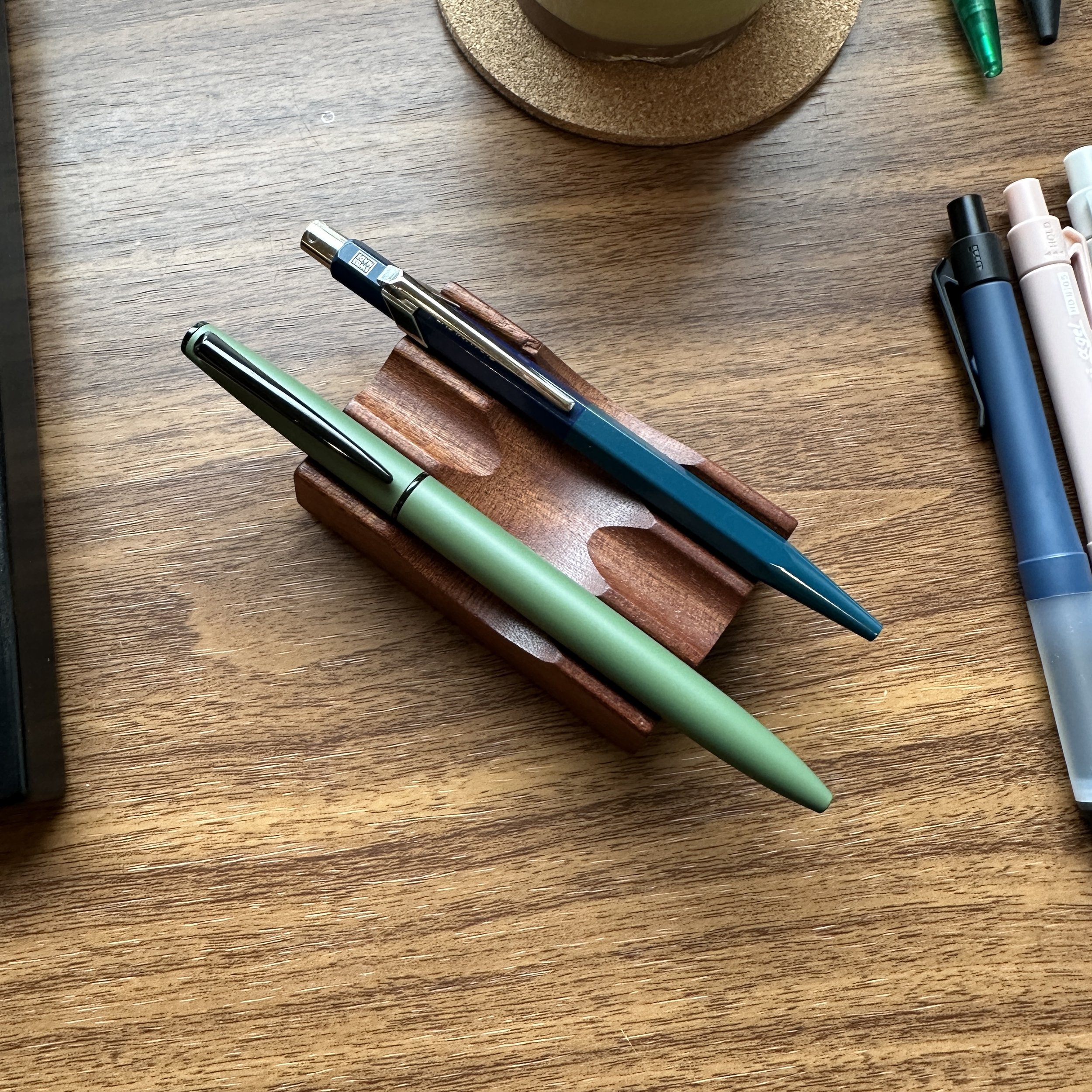
Uni Jetstream Prime and Caran d'Ache 849 Side by Side

Twist or Click: What's Your Retractable Pen Preference?

February 10, 2024

Within the broader world of pens, enthusiasts have many different choices to make. Fountain pen, rollerball, or ballpoint? Bottled fountain pen ink or ink cartridge? Post your pens or don’t post your pens? There’s no “right” answer, as all of these end up being matters of personal preference (though heatedly debated online). One discussion, however, has been the subject of surprisingly little conversation throughout my years in the community: the pros and cons of different retractable pen mechanisms.

Why Does The Mechanism Matter?

To begin, let’s assume that you’ve already decided that you want a retractable pen vs. a capped pen. You do most of your writing “on the go,” whether that be in the field, in the car, in the kitchen, standing at the back of a crowded boardroom holding a clipboard, etc. You need a pen that you can quickly deploy, that writes reliably, and where you don’t need to worry about keeping track of a loose cap. Retractable it is!
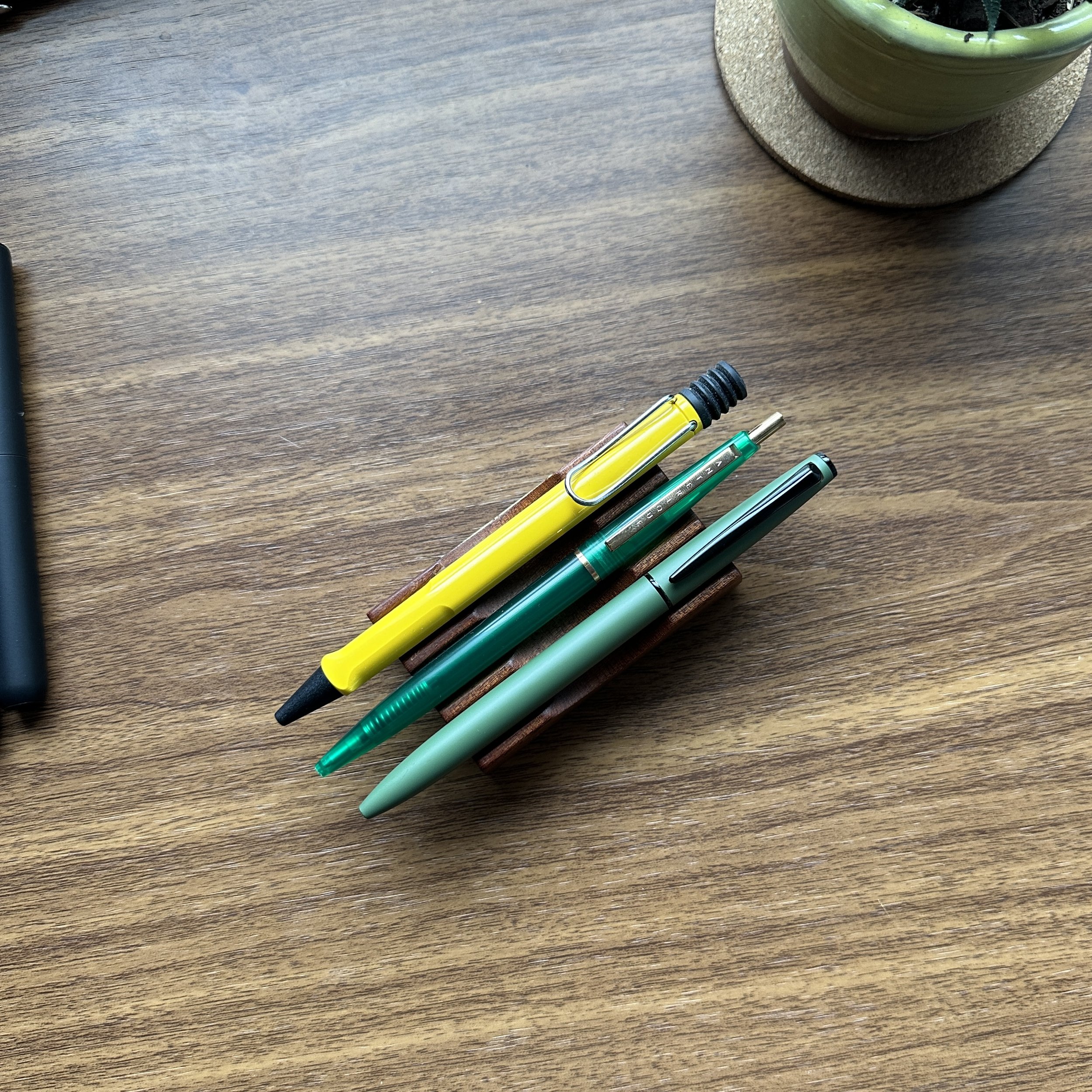
Lamy Safari Ballpoint Compared Against Anterique Ballpoint Compared to Uni Jetstream Prime

Both click pens and twist pens come in a wide range of formats, but pens within each category typically share a few things in common.

But many different pens are “retractable.” You have the classic click pen, and within that category, many more sub-categories of different click mechanisms (including not just the classic bolt-action pens and “side-click” pens with release buttons). The second largest group of retractable pens are twist-activated, which typically involves turning part of the barrel to deploy the refill - or in the case of a twist-retractable fountain pen like the Lamy Dialog3 - the nib. Each category has its own set of considerations, and while I personally use both, the “better choice” for you is definitely context-dependent.

Six Click Pens, from Left: Caran d’Ache 849 Paul Smith; Lamy 2000 Ballpoint, Anterique Ballpoint, Pilot G2 Limited, Pilot Vanishing Point, Tombow Airpress (a/k/a the greatest fidget toy of all times - that knock is addictive!)

The Pros and Cons of the “Click Pen”

This article won’t dive into the particularities, advantages, and disadvantages of different styles of click-mechanism: that’s a rabbit hole for another day. But in general, I’m referring to any pen that allows you to click a button at the end of the pen to deploy the tip or nib. Examples of common click pens in this category include: the vintage-style Bic Clic (Field Notes version and countless other Clic-inspired pens like those from Anterique); Pilot G2/Zebra Sarasa/similar gel pens; Caran d’Ache 849 (both ballpoint and rollerball); the Lamy Safari Ballpoint, and on the fountain pen side, pens like the Pilot Vanishing Point/Decimo and the Platinum Curidas.

Why write with a click pen?

  • Speed. If what you’re looking for is a writing instrument that allows you to get writing quickly with little to no fuss, you need a click pen. The classic example is the newspaper reporter in the field, pairing a Bic Clic with a spiral bound reporter’s notebook. Clicking the end of the pen to extend/retract the tip takes no time at all.

  • Ease of Use, Especially One-Handed. I spend a lot of time writing while standing, holding a legal pad or portfolio in one hand and a pen in the other. In addition to speed, a click-pen allows you to operate the pen one handed.

  • Low Cost. Click pens are generally less expensive than other options, as most mechanisms are mass-produced. As noted below in the “twist-pen” discussion, this can lead to long-term durability issues, but you still have to work pretty hard to wear out even the cheapest click pen.

The main drawback to a click mechanism is that it’s easy to accidentally deploy the refill in your pocket or bag. While not a huge deal with a ballpoint or gel pen, both of which use more viscous inks, this type of “inkcident” can be disastrous with a liquid ink pen such as a capless rollerball or fountain pen. I’ve personally ruined countless pairs of pants by carrying click pens in my pocket, to the point where I hardly use capless rollerball refills anymore and have mostly moved to low-viscosity ballpoint cartridges in all of my click pens. (If a capless fountain pen like a Vanishing Point accidentally deploys, you can also bend the nib, but it’s much less common for people to try to carry these pens loose in a pocket or bag because they’re more expensive.)
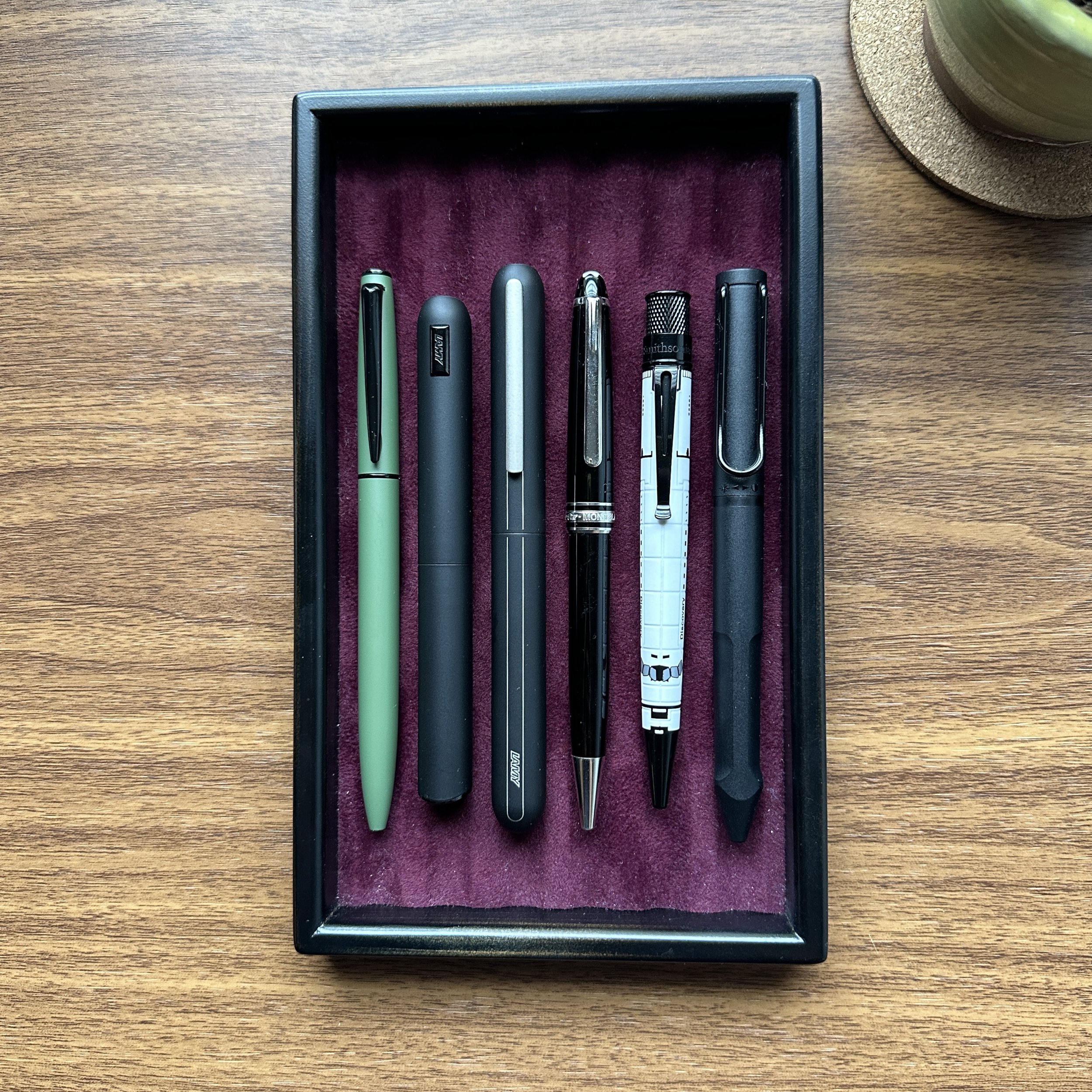
Six Twist Action Ballpoints Arrayed on a Tray

Six twist pens, from left: Uni Jetstream Prime, Lamy Dialog CC, Lamy Dialog3, Montblanc Classique Ballpoint, Retro 51 Tornado, Lamy Safari Twin Pen 2-in-1.

The Pros and Cons of a Twist Pen

If you enjoy pocket carry, or like to store pens in pen loops or slots built into your bags and/or portfolios, you might prefer a pen with a twist-action mechanism. The main advantage for me personally is that there is a lower risk of accidentally engaging the mechanism and having ink from the refill leak into the interior of your bag or pocket. While it’s a bit more difficult to use the pen one-handed, many people prefer the streamlined design of twist pens over the somewhat inelegant push-button knock. Examples of common twist-action pens include fancier options from Montblanc and Waterman, as well as less expensive pens like the Uni Jetstream Prime, the Baron Fig Squire, and the Retro 51 Tornado.

Uni’s Jetstream Prime is a slim ballpoint with an excellent refill and a great price point.

Why Write with a Twist Pen?

  • Lower Risk of Ruining Your Bag or Clothing. As noted above, this one is fairly straightforward. It’s much more difficult for a twist pen to accidentally deploy, though of course it can happen. (To be absolutely safe, I often recommend that people only carry capped pens in their pockets.)

  • Increased Durability. Click mechanisms tend to wear out. Most of the parts used in lower-cost, mainstream pens are mass-produced and not designed to last forever. Combined with the tendency to use pens as fidget toys, most click pens will eventually break. In my personal experience twist-action pens have fewer moving parts and therefore last longer. Some of my nicer twist ballpoints, such as my Montblanc 144 “Classique” and Waterman Expert, are upwards of 25 years old. And don’t get me started on all those Cross Century and Century II pens from the 1960s….

  • Streamlined Design. Without the need for a button (or “knock”) at the end, twist pens can adopt more elegant, streamlined designs. The difference is especially apparent when you get into higher-end writing instruments. For example, Pilot does an excellent job incorporating the knock into the design of the Vanishing Point and Decimo, but Lamy scores points for the design work on their twist-action “Dialog” series.
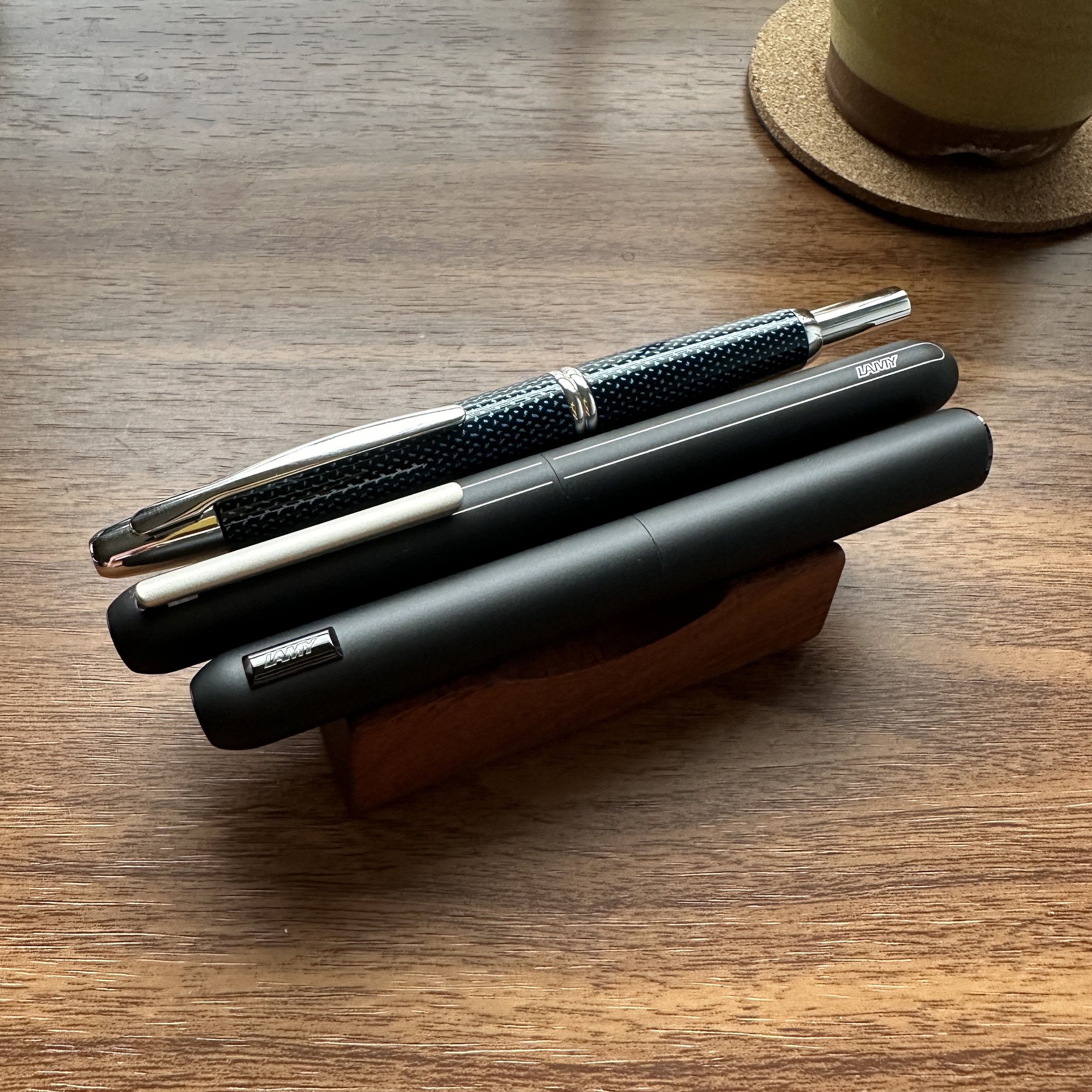
Three Retractable Fountain Pens: Pilot Vanishing Point Lamy Dialog 3 Lamy Dialog CC

As good as they look, the Lamy Dialog pens also make my point about click pens being a lower-cost option: The Lamy Dialog CC and Dialog 3 can cost as much as 2x the Pilot Vanishing Point.

Did You Enjoy This post? Come See Me This Week at the California Pen Show!

The primary focus of The Gentleman Stationer, both the informational site our curated retail shop, is to help people find practical stationery that fits their everyday writing needs. I firmly believe that stationery is meant to be used, not just hoarded or collected, and I approach everything from the perspective of an everyday user as well as an enthusiast. Retractable pens are one of those ubiquitous items that everyone uses - typically without thinking much about it - though with just a bit of thought and consideration you might be able to upgrade your writing experience even more. There are so many different options out there!

Today’s post on retractable pens is just one of many different topics I’ll be discussing in my seminar "Stationery for Everyday Writing: Choosing Pens, Inks, and Paper for Your Daily Life”. I have two time slots: 2:30pm PT on Friday and 11:00 am PT on Saturday. I’ll also be hosting the “Pen Shows After Dark” event on Friday, which will be on-site at the show hotel. There’s no cost to attend any of the events I’m participating in, so please do stop by!

The Gentleman Stationer is supported entirely by purchases from the T.G.S. Curated Shop and pledges via the T.G.S. Patreon Program.
In Comparison, Editorial Tags Editorial, Click Pens, Twist Pens, Ballpoint Pens, Retractable Fountain Pens
1 Comment

Hierarchies of Fountain Pen Friendly Paper, Updated as of January 24, 2024!

January 24, 2024

I’ve taken some time this week to update another site resource, as part of an ongoing project that I plan to continue in response to reader feedback. Apparently many of you find these comprehensive resources helpful, especially for those new to fountain pens, inks, and quality paper!

This particular post, titled “Hierarchies of Fountain Pen Friendly Paper,” originated back in March 2021 in response to reader requests for an overall “guide” to fountain pen friendly paper. Honestly, there are so many different paper options out there that it’s impossible to rate, much less rank, them all, but this post grouping some of the more popular brands into “Tiers” of fountain pen friendliness has proven helpful to a lot of you so I’ll keep it going! I also want to maintain this as a “post”, as opposed to a “page”, because it has a rich comment section with lots of different recommendations for papers not yet available in the U.S. market. Today’s update adds a few new brands that I’ve discovered, and deletes some paper options that are no longer available due to their having been discontinued. Enjoy!

The Gentleman Stationer is supported entirely by purchases from the T.G.S. Curated Shop and pledges via the T.G.S. Patreon Program.

In Editorial, Updates Tags Fountain Pen Friendly Paper, Editorial
Comment

One of the major things that also shocked me was the number of inks I thought I had reviewed, but actually had not.

Introducing the T.G.S. Fountain Pen Ink Review Archive!

January 20, 2024

Last year, I compiled and launched an archive containing all of the T.G.S. fountain pen reviews organized by brand. This morning, I finished updating an addition: a full archive of ink reviews, organized by color family and brand. I was surprised to learn that the current total is 114 ink reviews going back to 2014! There are also some editorial “best inks for ____ purpose” posts which are organized elsewhere in the informational resources section.

A note on this archive: One of the fun things about fountain pen inks is that some of them defy categorization. An ink that might appear green to me might lean more brown or grey to others, so please don’t take any of my “labels” as definitive. I hope you enjoy, and this will be regularly updated as more reviews are completed!

The Gentleman Stationer is supported entirely by purchases from the T.G.S. Curated Shop and pledges via the T.G.S. Patreon Program. We greatly appreciate your support!

In Ink Reviews, Editorial Tags Ink Review, Fountain Pen Ink, Ink Review Archive, Content Archive
Comment

Strategic Paper Replacement: Adventures in E-Ink, Part I (The Physical Writing Experience)

January 6, 2024

I have a love-hate relationship with so-called “digital paper”, both the idea and the reality. I've owned some version of Apple's iPad Pro for years, but stopped upgrading it after a while due to general disuse. While it occasionally comes in handy when I need to sign something electronically, mark up a longer document for my day job, or where a hand markup needs to be easily distributed to a wider group via e-mail, I otherwise find the writing experience on the iPad to be (1) far less satisfying than writing on real paper due to the lack of a tactile experience; and (2) subject to the same distractions as a computer, to the point where it's much harder to lose yourself in the work than with a notebook and a pen.

But I'm a reader, researcher, and notetaker by nature, so I’ve continued to experiment. I accumulate a LOT of paper, and the idea behind a digital writing device still intrigues me. I'm not opposed to digital tools where they are the best option and solve a real need, such as minimizing the volume of "junk paper" I generate, and anything that streamlines the process of organizing and archiving handwritten notes is a plus.

To that end, I acquired two e-ink devices last year, Amazon's Kindle Scribe and the Remarkable 2 e-ink tablet. While I can't say that I've fully bought in to either system, both devices pleasantly surprised me with the extent to which they duplicate, physically and mentally, the experience of writing on paper. While I originally sought to write a single comprehensive post discussing my thoughts on e-ink and these devices as a whole, I quickly realized that such a piece would quickly get too long and unwieldy, so I'm going to break it out into multiple installments. First up: my thoughts on the physical writing experience, including available pen options.

  1. Writing on both the Kindle and Remarkable 2 feels more like actual paper than the iPad. The matte screens simply feel better than writing on glass. While the friction requires you to periodically replace the tip of the stylus as it wears down, replacements are generally inexpensive. (As an aside, I have tried the Paperlike screen protector for the iPad, and still prefer the feel of both e-ink tablets.)

  2. The pens/styli I have used are more comfortable to use for longer writing sessions than the Apple Pencil. Of the two "stock" options available, I actually prefer the Kindle Scribe Premium Pen ($59.99) over the much more expensive Remarkable Marker Plus ($129). Recently, I've been using aftermarket options, including the Lamy EMR AL-Star and the Lamy Safari "Twin Pen" (a multi pen that also includes a D1 ballpoint refill for when you want to switch writing modes). All of these options use Wacom's EMR (Electromagnetic Resonance) technology - no batteries are involved, so you don't have the battery anxiety that can be an issue with the Apple Pencil during a long working session or if you forget to charge it.

  3. I find the writing experience nearly as distraction-free as physical paper. Personal experience may vary, but I can "lose myself" in reading and writing with an e-ink tablet in a way that I've never experienced with an iPad. Whether it's due to digital distraction always being a click away, blue light, or something else, I don't know, but that's the reality.

The Remarkable 2 allows you to choose from a variety of line options, and vary both style and width. EMR technology is responsive to pressure, creating line variation that corresponds to light/heavy writing pressure. You will also see the “color option” I discuss below.

EMR pens feature different nib sizes - this is the round tip on the Lamy AL-Star.

For those who want to write a finer line (or who want to write on “glossy surfaces”, such as a Samsung device), Lamy makes a pointier nib. It will likely wear down quicker on matte surfaces.

Remarkable 2 Marker

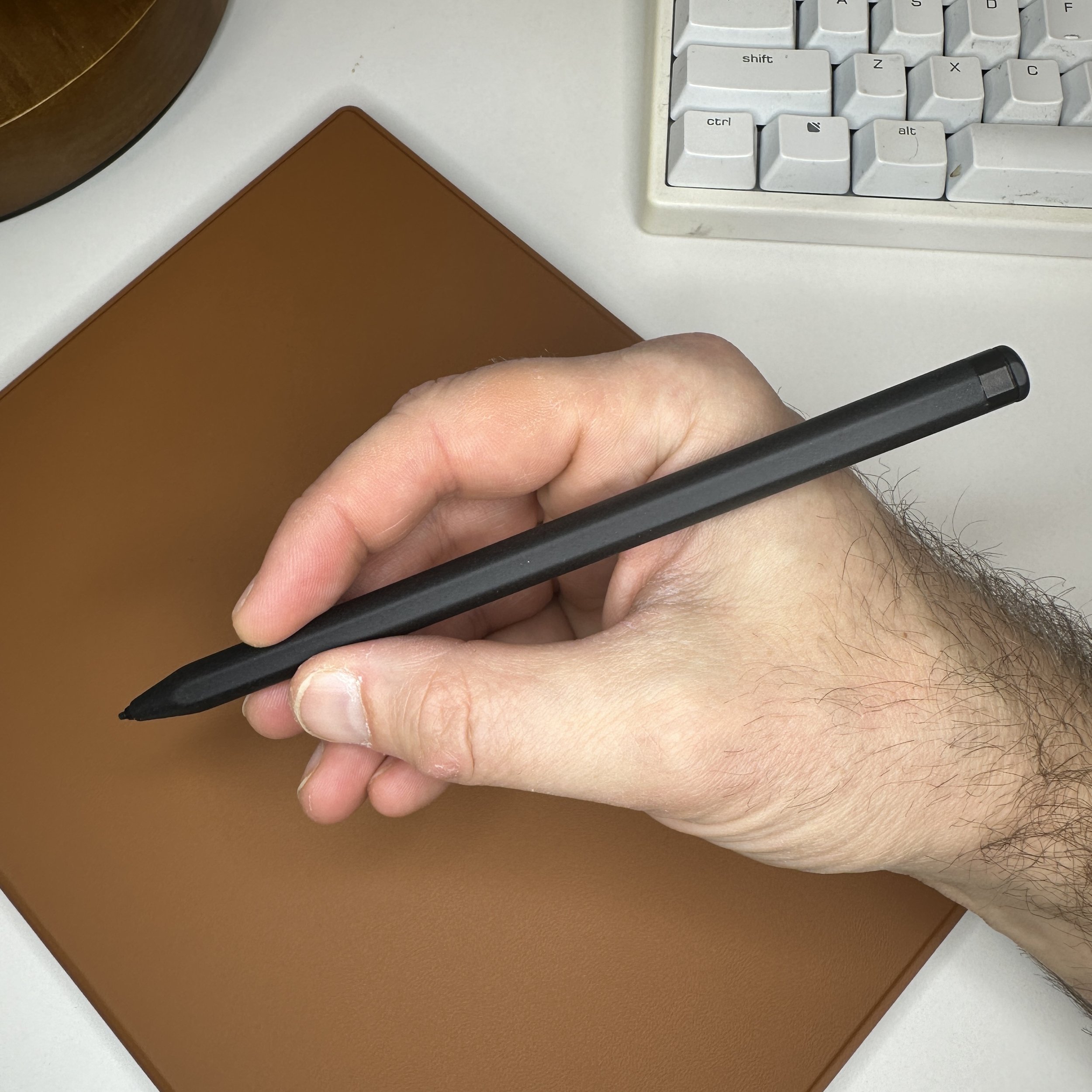
The standard Remarkable and Kindle styli both feel very much like a pencil. I prefer their weight and balance to that of the Apple Pencil.

Potential Drawbacks To Consider

  1. While there is very little latency ("lag") in the current generation of e-ink tablets, it's still there. I've not found it to interfere with my enjoyment of the overall experience, and I would describe it as “minimal” with both the Scribe and the Remarkable 2.

  2. The lack of a color display limits the ability to highlight and annotate documents in different colors. While the settings do allow you to change colors, you'll only be able to view color in exported documents, not on the device. (I know you can change colors with the Remarkable 2 - I've not tried on the Kindle Scribe as Amazon's software makes it fairly difficult/inconvenient to import and organize PDFs and other documents for annotation purposes so I generally don’t use it that way. More on that in a later installment.) Other companies have recently released tablets with color e-ink screens, but they are expensive (i.e., approaching $700).

  3. Some might find the technology expensive for a single use device. That said, with as much as I read and write (hours per day), $300 for the tablet doesn't strike me as outrageous. Remarkable-branded accessories can be pricey and raise the price of the device to around $600 if you opt for the most expensive pen and folio, but if all you want is a simple no-keyboard folio cover and a Wacom-compatible pen, there are much less expensive generic options out there that don’t compromise the experience.

So What's Still to Come?

In addition to recommitting to a journaling habit, one of my goals for 2024 is to be a bit more systematic in how I use paper, and especially in how I organize notes so that I'm able to locate them for reference later. I've been using the Remarkable 2 as both a digital notebook and e-reader (mainly for articles that I want to highlight and annotate in pdf form), with the Kindle Scribe as my primary reading device for longer books that I can annotate yet don't want to carry with me when I'm traveling. Both devices allow me to export markups to my computer for archiving.

The Remarkable 2 software syncs your handwritten notes with the desktop app, and has functions that include handwriting conversion and the ability to type annotations directly into the document from your computer. I’ll go into the functionality in more depth at a later date, but you can export the documents in PDF form to save elsewhere or distribute to others as necessary.

At some point I will do more in-depth installments on the ins and outs of each tablet, including my thoughts on the software and any friction points encountered while integrating these devices into a workflow. To that end, if you're considering purchasing an e-ink tablet, I would carefully consider how you want to use it before making a decision. If you're essentially looking for an e-reader with a large screen that you can use to make handwritten notes and highlights, and use occasionally as a digital notebook, the Kindle Scribe gives you access to Amazon's large library (including Kindle book you already own) with basic e-ink notebook functionality. On most Kindle books the handwriting function is generally limited to "sticky notes" (picture below), but this is already changing as Amazon tweaks their software, and “write anywhere” books are being made available in the Kindle Store. At the moment, the Remarkable 2 has more out-of-the-box functionality and a more intuitive interface, allowing you to read (and annotate) DRM-free e-books, PDFs, and online articles sent to the Remarkable via a Chrome extension. If you spring for the (pricey) keyboard cover, you even can turn the Remarkable 2 into an e-ink typwriter similar to a Freewrite. For those whose primary goal is notetaking and handwriting, I would recommend starting with the Remarkable or something like it.*

As with standard Kindle highlights and typed notes, Amazon allows you to export a pdf of your notes and annotations.

*Note: I recognize other options are available. I know many people who enjoy their Supernote and Boox tablets, but I'm not currently interested in the ability to add Android apps and I otherwise don't see enough of a difference in the handwriting functionality to convince me to buy another device.

This post does not contain affiliate links. TGS is supported via purchases from the T.G.S. Curated Shop and pledges via the T.G.S. Patreon Program. If you enjoyed this content, please consider supporting us!

In Editorial, Pens Tags Remarkable 2, Kindle Scribe, E-Ink Devices, Digital Divide
3 Comments

Back to Hobonichi: My Daily Journaling Setup for 2024

January 3, 2024

I spent a lot of time over the past four months thinking about how I wanted to approach journaling in 2024. Over the past year, I definitely became more consistent in terms of how often I sit down to write (always by hand, never on the computer), but until my work sabbatical in October didn’t spend much time thinking through a coherent journaling strategy and how I wanted to use journaling to support my personal and professional goals. After some experimentation, I decided to divide my journaling between three different books: (1) a professional “journal” that I use to track how I spent my time each day, mainly on work and more structured personal projects; (2) a “observations” journal that’s in a smaller format I can carry with me; and (3) a more traditional “reflections” journal that I write in each morning.

*Note: I don’t use a traditional paper “planner” (i.e., a calendar to track dates and appointments) for professional reasons. My schedule is too complex and deadline-dependent to rely on manual updates and edits, especially since due dates and meetings constantly change (often without my knowledge). I mention this up front because I know that I’m going to get the question: why does someone need three planners? The answer is that even though the Hobonichi Techo - and other similar “planners” such as those from Stalogy and the Midori Codex - are marketed as traditional calendar/diaries, the layouts are extremely flexible and can easily be used as journals or dated notebooks, which is how I’ve always viewed them.

Journal No. 1: Hobonichi Cousin A5

My primary everyday professional notebook/journal is going to be the Hobonichi Cousin A5. For the last quarter of 2023, I experimented with “time blocking” as part of an effort to improve my concentration and focus, which is a time-management technique that can be helpful for those of us who work more than one job and/or whose profession involves managing multiple complex projects. A full discussion of this technique (and how I’ve adapted it to my needs) is beyond the scope of this simple blog post, but the general idea is that you sit down each morning for 15-20 minutes and plan out your day in blocks of time dedicated to a specific task or project, to the exclusion of anything else that may distract you. You intersperse your day with “admin” blocks to keep up with more routine things such as e-mail, phone calls, paying bills, etc. It might seem rigid at first, but two things happen: (1) the “a time and place for everything” philosophy underlying the structure creates space for better concentration, and eventually you’re more easily able to resist things such as checking e-mail that pull you out of the work your doing because you know you’ve set aside time for them later; and (2) you’re able to finish tasks quicker because you’re giving yourself the space to concentrate on a single thing rather than multi-tasking.

Yes, the Cousin fits in the Roterfaden, but you will need to embrace the “one notebook” Roterfaden strategy (unless you go with the Cousin Avec).

For those interested in learning more, I’d recommend picking up a copy of the “Time Block Planner” (the most recent version of which contains decent paper). I found that the layout didn’t work perfectly for me - I think it’s actually intended more as a “workbook” to help you learn the technique for the first time - but the experience of working through the planner for eight weeks or so was invaluable.

A sample time block plan. Obviously I had to redact details.

I draw my time blocks on the left-hand side of the Hobonichi Techo, and use the remainder of the daily page for my “catch-all” notes and administrative task lists. If you’re in the middle of a time block and an unrelated thought/task/observation pops into your head, you jot it down in the free space on your planner or notebook. In addition to being useful for organizing my work and thoughts, I enjoy having a fairly detailed record of exactly how I spend my time. The page layout of the Hobonichi Cousin A5 is well-suited to how I time-block.

I use the monthly calendar as a way to experiment with content plans. (Most of this is a draft which then gets imported into my computer as I decide what I’m going to publish/write about.)

I currently have the Hobonichi Cousin in my A5 Roterfaden binder. Because the Cousin is a thick notebook, I attached it to the Roterfaden using the center clip, use the front clip as a bookmark for the “weekly” view, and plan to use the third clip to hold loose papers, etc. (For those who are interested, we currently have A6 Roterfadens in stock with another shipment of A4 and A5 binders on the way from Germany as we speak.)

On Sunday afternoon I try to sketch out a “weekly time block plan” which is intended to be rough. I then flesh it out either in the morning before the workday starts or the night before.

Journal No. 2: Hobonichi Weeks Mega

Less a journal and more of an “observations” notebook without any strict format requirements. This year I’m making a conscious effort to be more present, to read more, and generally to engage in activities that necessarily require a longer attention span, such as tackling more difficult books and watching longer films. I constantly collect book and movie recommendations, and always maintain a running annual list of books read/movies watched for the year, which is probably how I will use the blank pages at the back of the Weeks. I also enjoy having a “week on a page” layout, which I’ve used so far to jot down just one or two memorable things I did/observed on each day. My Hobonichi Weeks had a start date of November 27, 2023, so I already have about six weeks under my belt.

Journal No. 3: Hobonichi A6

Finally, my third journal is my reflections journal. I’ve managed to keep up my morning journaling routine to the point where I reliably write most mornings, reflecting on the prior day. For this journal I chose the standard Hobonichi A6, which contains just enough space to allow me to write a meaningful entry in 30 minutes or less.

I don’t have a cover for this third journal yet. As discussed below, I’m waiting for a new shipment of Roterfaden Taschenbegleiter covers, so I may choose an A6 size for this one, but since this journal typically stays on my desk at home the best choice might be a slimmer Gfeller undyed leather cover or one of the Galen Leather “Crazy Horse” varieties.

Stay tuned, because throughout the year, I plan to share more about both journaling strategies and my likes/dislikes of the various Hobonichi editions. Currently, they’re all pretty much exactly what I was suspecting, with no surprises other than how effortless it’s been to enjoy them. Happy New Year, everyone!

The Gentleman Stationer is supported entirely by purchases from the T.G.S. Curated Shop and pledges via the T.G.S. Patreon Program. You can read more about T.G.S. Patreon in yesterday’s post.

In Editorial, Notebook Review, Hobonichi, Journaling Tags Journaling, Notebooks, Editorial
3 Comments
← Newer Posts Older Posts →
Store Hours and Location
Visit the T.G.S. Curated SHOP
*New* Updated "Best Pens" Guide (2025)
T.G.S. 2025 Holiday Gift Guide
TGS x Roterfaden TGS_25
Hierarchies of Fountain Pen Friendly Paper

Join Our Patreon!
Subscribe to the TGS E-mail List

Featured Posts

Featured
Cover On the Paper Trail Intro Clip.jpeg
Dec 3, 2025
Introducing "On the Paper Trail," a New Podcast/Video Collaboration with Lisa Vanness of Vanness Pens!
Dec 3, 2025
Dec 3, 2025
Iro-Utsushi-Fine-Dip-Pens.jpeg
Oct 1, 2025
The Pilot Iro-Utsushi Dip Pen (and in General, Simple vs. Fancy Dip Pens)
Oct 1, 2025
Oct 1, 2025
Levenger-Annotation-Pad.jpeg
Sep 20, 2025
Five Boutique Paper Brands I'm Watching Closely and Why
Sep 20, 2025
Sep 20, 2025
The Gentleman Stationer RSS

© Digital Divide Media, LLC, 2014-present.

All content is the exclusive property of Digital Divide Media, LLC, d/b/a The Gentleman Stationer, including “The Gentleman Stationer” website and trademark, and should not be reproduced without express written permission.  All rights reserved.

All content containing paid advertising, affiliate links, or sponsored content will be plainly disclosed by a disclaimer when/if featured.

Contact Information

Store Shipping Policy and Return Policy

Privacy Policy

Cookie Policy

Terms and Conditions

Powered by Squarespace